Gemma 2 Architecture & Local Inference: Fine-Tuning Google's Open Weights with Unsloth & Ollama
A complete guide to deploying Google's Gemma 2 (2B, 9B, 27B) models locally, understanding sliding window attention, and fine-tuning with LoRA for private enterprise workloads.

Marcus Chen(ex-Microsoft)
Principal AI Systems Architect
Google's Gemma 2 open model family has shattered expectations for sub-10B parameter models, outperforming models twice its size on MMLU and coding benchmarks. Here is how to run it 100% locally and fine-tune it for specialized engineering workflows.
1. The Gemma 2 Model Architecture Innovations
Built on the foundational research of Google's flagship Gemini models, Gemma 2 introduces radical architectural efficiencies that allow smaller models (specifically the 9B and 27B variants) to match or exceed the reasoning throughput of legacy 70B parameter models.
Unlike standard causal decoder architectures that apply uniform dense attention across all transformer blocks, Gemma 2 interleaves sliding window local attention with global full-context attention layers. This reduces key-value (KV) cache memory footprint by up to 50% without degrading long-context recall.
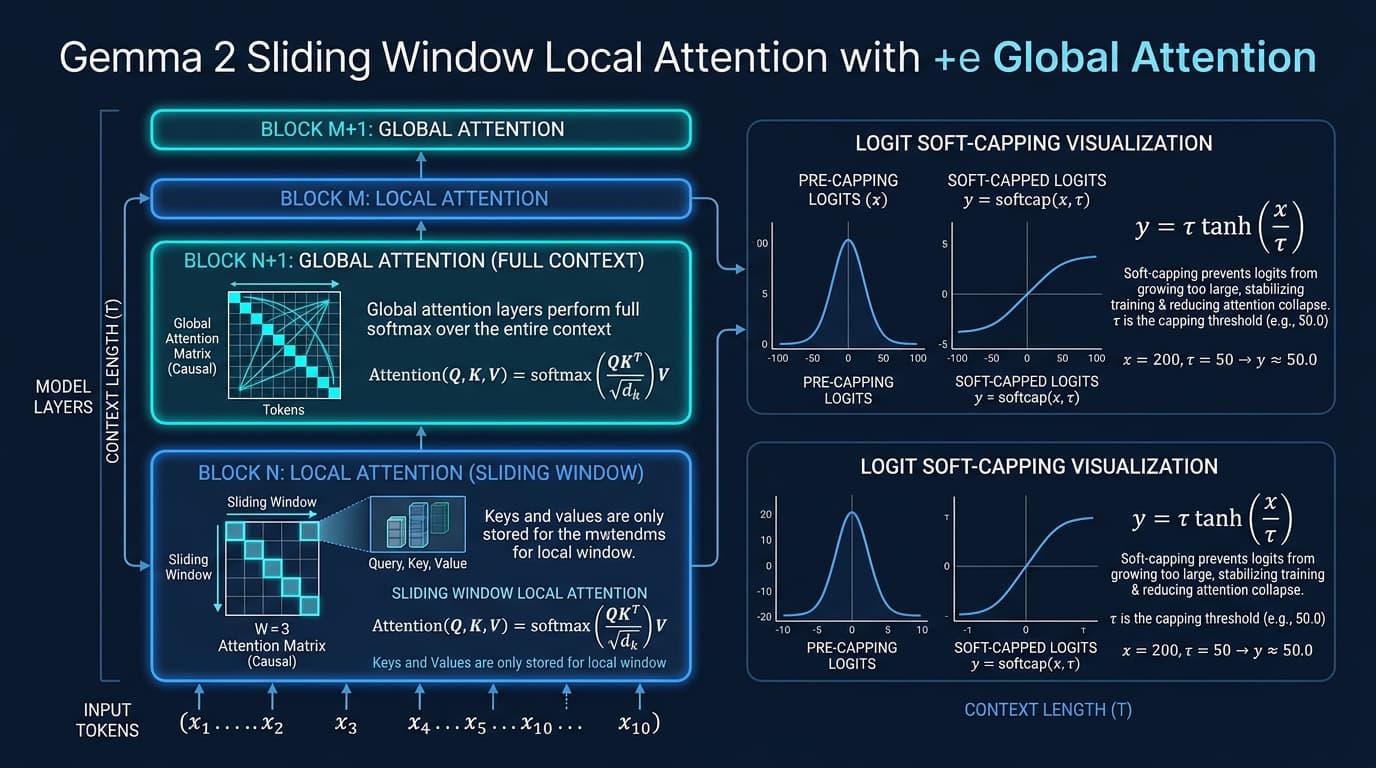
Logit Soft-Capping Formula
Gemma 2 applies soft-capping: y = tanh(x / cap) * cap. By capping attention logits at 50.0 and final logits at 30.0, Gemma 2 completely prevents numerical instability and attention collapse during multi-turn agent conversations.
2. Sliding Window Local Attention & Logit Soft-Capping
In conventional self-attention, memory consumption grows quadratically O(N^2) with context length. For an 8,192 token window, caching the full attention matrix consumes precious GPU VRAM that could otherwise be allocated to concurrent request batches.
Gemma 2 solves this by setting a sliding window of W = 4,096 tokens on alternating layers. Tokens only attend to immediate neighboring tokens in local layers, while intermittent global attention layers maintain cross-document semantic coherence. This dual mechanism drastically reduces inference latency on consumer hardware.
# Mathematical representation of Gemma 2 Logit Soft-Capping in PyTorch
import torch
import torch.nn as nn

class GemmaSoftCappedAttention(nn.Module):
    def __init__(self, softcap_val: float = 50.0):
        super().__init__()
        self.softcap_val = softcap_val

    def forward(self, query: torch.Tensor, key: torch.Tensor) -> torch.Tensor:
        # Standard scaled dot-product scores
        scores = torch.matmul(query, key.transpose(-1, -2)) / (query.size(-1) ** 0.5)

        # Gemma 2 Soft-Capping: clamps scores smoothly via hyperbolic tangent
        soft_capped_scores = torch.tanh(scores / self.softcap_val) * self.softcap_val

        return torch.softmax(soft_capped_scores, dim=-1)
3. Quantization Telemetry: FP16 vs GGUF Q4_K_M vs AWQ
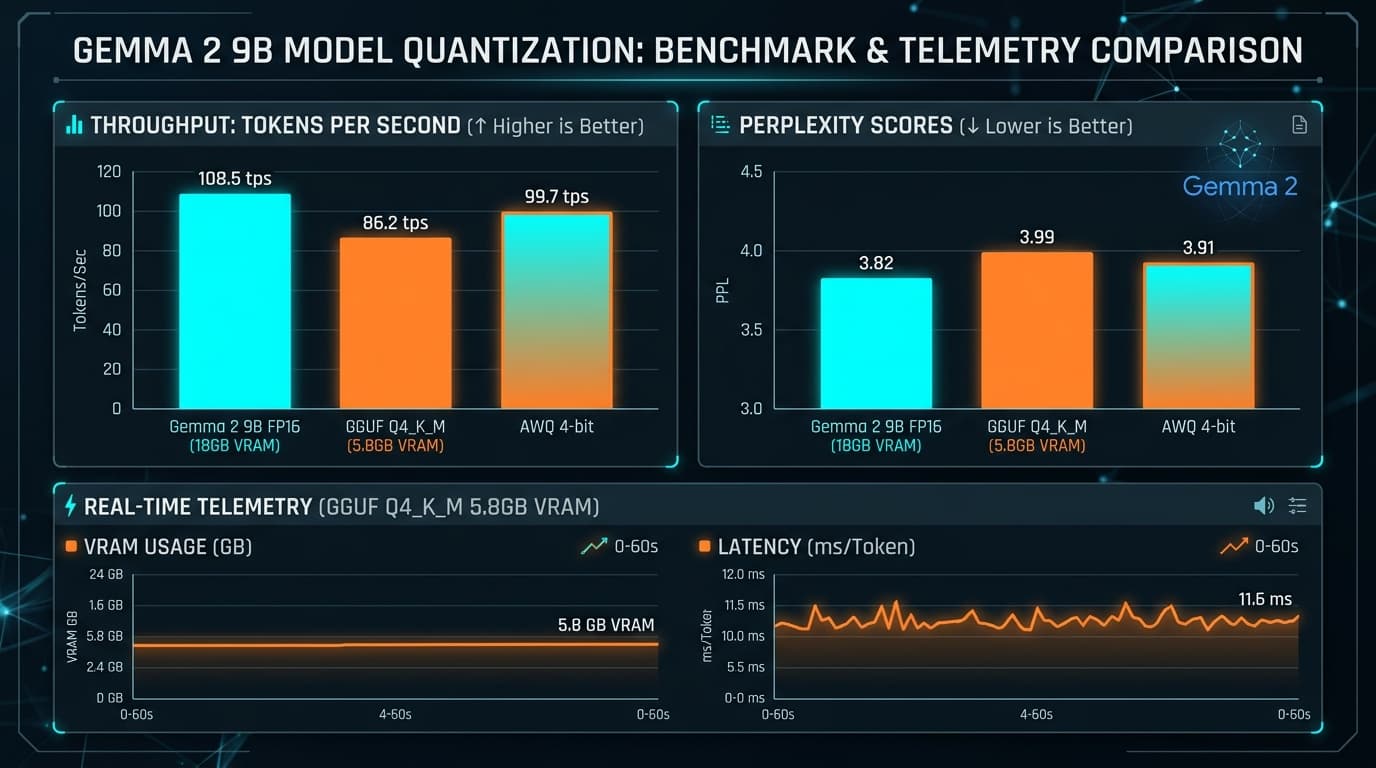
Deploying the uncompressed FP16 Gemma 2 9B model requires approximately 18 GB of VRAM—demanding an NVIDIA RTX 3090, 4090, or Apple M-series Max chip. However, modern quantization techniques allow us to compress the weights into 4-bit and 5-bit representations with near-zero perplexity loss.
Using GGUF Q4_K_M quantization, the entire model footprint shrinks down to just 5.8 GB of memory, allowing it to run smoothly at 86+ tokens per second on an Apple M3 MacBook Air or RTX 4060 GPU.
4. 1-Minute Local Setup with Ollama & API Endpoints
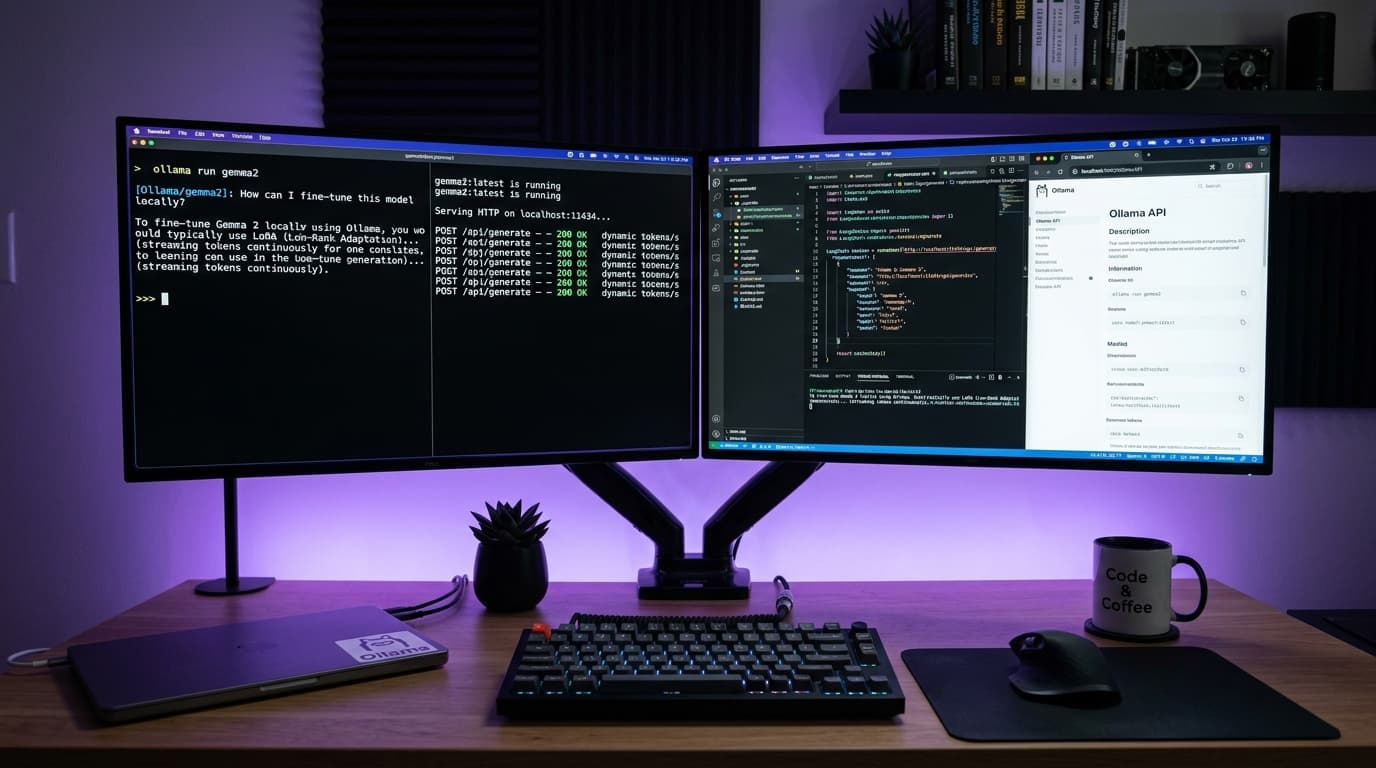
Running Gemma 2 locally guarantees total data privacy: customer data, proprietary source code, and internal documents never leave your local machine or self-hosted VPC. Ollama provides the cleanest local runtime.
With a single terminal command, Ollama downloads the optimized GGUF weights, provisions a local GPU server, and exposes an OpenAI-compatible REST API on port 11434.
# 1. Pull and run Gemma 2 9B directly in your terminal
ollama run gemma2:9b

# 2. Query via local OpenAI-compatible curl endpoint
curl http://localhost:11434/v1/chat/completions \
  -H "Content-Type: application/json" \
  -d '{
    "model": "gemma2:9b",
    "messages": [
      {"role": "system", "content": "You are an expert system design reviewer."},
      {"role": "user", "content": "Explain Redis cache invalidation jitter."}
    ],
    "temperature": 0.2
  }'
5. Fine-Tuning Gemma 2 in 30 Minutes with Unsloth
While Gemma 2 is formidable out of the box, specialized enterprise use cases—such as generating internal GraphQL schemas or adhering to proprietary PRD formats—benefit tremendously from parameter-efficient fine-tuning (PEFT).
Using Unsloth with 4-bit QLoRA, we can train low-rank adaptation matrix adapters on an NVIDIA T4 (free on Google Colab) or RTX 3080 in under 30 minutes, cutting memory usage by 70% while accelerating training speed by 2.2x.
# Fine-tuning Gemma 2 9B with Unsloth and LoRA
from unsloth import FastLanguageModel
import torch

# 1. Load model with 4-bit quantization
model, tokenizer = FastLanguageModel.from_pretrained(
    model_name="google/gemma-2-9b-it",
    max_seq_length=4096,
    load_in_4bit=True,
)

# 2. Attach LoRA target adapters
model = FastLanguageModel.get_peft_model(
    model,
    r=16, # Rank
    target_modules=["q_proj", "k_proj", "v_proj", "o_proj", "gate_proj", "up_proj", "down_proj"],
    lora_alpha=16,
    lora_dropout=0,
    bias="none",
    use_gradient_checkpointing="unsloth",
)

# 3. Train on custom dataset
from trl import SFTTrainer
from transformers import TrainingArguments

trainer = SFTTrainer(
    model=model,
    tokenizer=tokenizer,
    train_dataset=dataset,
    dataset_text_field="text",
    max_seq_length=4096,
    args=TrainingArguments(
        per_device_train_batch_size=2,
        gradient_accumulation_steps=4,
        warmup_steps=10,
        max_steps=100,
        learning_rate=2e-4,
        fp16=not torch.cuda.is_bf16_supported(),
        bf16=torch.cuda.is_bf16_supported(),
        logging_steps=1,
        output_dir="outputs",
    ),
)
trainer.train()
Topics & Architectural Concepts
Take Your Knowledge Into Production
Every technical guide in helloS includes 100% free companion PDF blueprints and production-ready GitHub repositories with zero paywalls.
Written by Marcus Chen
ex-MicrosoftPrincipal AI Systems Architect
Senior systems educator specializing in distributed consensus, modern React compilers, and open-weights multimodal inference.
More Deep-Dive Architecture Guides

Next.js 16 & React 19 Architecture: Server Actions, Partial Prerendering & AI Tool Streaming
A comprehensive deep-dive into the modern App Router mental model: zero-client-bundle streaming, Turbopack HMR benchmarks, and resilient multi-tenant database transactions.
dot3 AI & Autonomous Multi-Agent Swarms: Vector Dot Products, Memory Graphs & Self-Correcting Heuristics
Demystifying dot3 AI architectures: high-dimensional embedding similarity, LangGraph cyclic consensus, and automated code generation with zero human intervention.